
Automating company processes: From tools to AI systems
 Published
 Every day your company wastes money on tasks that no one should be doing manually. Answering the same questions from customers, manually copying data between Excel and your CRM system, preparing cyclical reports - all of this consumes time and energy that could be invested in development. Have you ever wondered how much such hidden inefficiencies are costing you?
Many entrepreneurs feel that automating their company’s processes is the solution, but get lost in the maze of technical terms, tools and opportunities. They feel overwhelmed and don’t know where to start.
This guide was created just for you. We will take you step by step through the world of automation. We will show you that you don’t have to be an engineer to use it. Our goal is to provide you with the knowledge that will allow you to make an informed decision and take the first, confident step towards a more efficient and modern company.
Table of Contents:
- Why is automation no longer a luxury, but a necessity?
- What can be automated in your company? Concrete examples
- The road to automation - 3 levels of sophistication
- How to get started. Automation step by step
- The most common pitfalls - what to watch out for?
- Summary: Your first 3 steps into the world of automation
Why is automation no longer a luxury, but a necessity?
The short answer is: because your competitors are already doing it. The long answer is a list of benefits that go far beyond simply saving time. We’re talking about a fundamental change in the way your business operates.
- Cost reduction: Fewer labor hours spent on repetitive activities means direct savings on salaries. Systems can operate 24/7 without interruptions or vacations.
- Eliminate human error: Humans, even the best, sometimes make mistakes. When copying data, issuing invoices or entering orders, it is easy to make a mistake that can cost the company real money. An automatic machine does not make mistakes - it always works according to a preset pattern.
- Greater efficiency and scalability: An automated process can handle 10, 100, or even 1,000 operations at the same time, with no drop in quality. When your business grows, you don’t have to proportionally increase your administrative staff - you scale your systems.
- Better use of talent: Did you really hire a capable marketer just to manually paste data into reports? Automation frees your employees from tedious tasks, allowing them to focus on what brings real value - creativity, strategy and customer contact.
- Faster customer service: Imagine a customer asks a question about the status of an order in a chat room at 10:00 p.m. An automated machine can immediately check the information in the system and provide an answer, instead of making the customer wait until the morning for an employee to respond.
Let’s look at it this way: lack of automation is a hidden technological debt. The longer you delay, the more you lose and the harder it will be for you to catch up with the market.
What can be automated in your company? Concrete examples
Virtually any repetitive, rule-based process is a candidate for automation. To give you a concrete picture, we’ve broken down the examples by department that exist in most companies.
Marketing and Sales
- Segmentation and mailing: Automatically send personalized messages to customers who, for example, abandoned their shopping cart or did not open the last newsletter.
- Lead management: A system that self-assigns new inquiries to salespeople based on certain criteria (such as location or company size).
- Reporting: Automatic generation of weekly campaign performance reports, pulling data from Google Analytics, Facebook Ads and your CRM.
Customer Service
- Simple chatbots: Answering Frequently Asked Questions (FAQs) 24/7.
- Ticketing systems: Automatic creation of service requests from incoming emails to the address
pomoc@twojafirma.pland assigning priorities to them. - Satisfaction surveys: Automatically send a feedback request the day after a service request is closed.
Logistics and Production
- Inventory management: A system that self-generates an order to a supplier when the inventory level of a particular product falls below a set minimum.
- Route optimization: An algorithm that plans the most efficient routes for your fleet of vehicles each day, taking into account current traffic congestion data.
- Delivery Appointments: automatic SMS notification to customers when their package is handed over to the courier.
Finance and Administration (Back-office)
- Document circulation: Electronic approval of vacation requests or expense invoices, which automatically go to the appropriate people
- Invoicing: Automatically generate and send recurring invoices for subscription customers.
- Debt collection: a system that sends reminders of upcoming payment deadlines on its own, and then reminders if the deadline is missed.
The road to automation - 3 levels of sophistication
Automation is not a single, monolithic entity. You can start with small steps and gradually increase sophistication as your needs and budget grow. At CODEAGENCY, there are three main levels.
Level 1: Simple tools “out of the box” (No-code / Low-code)
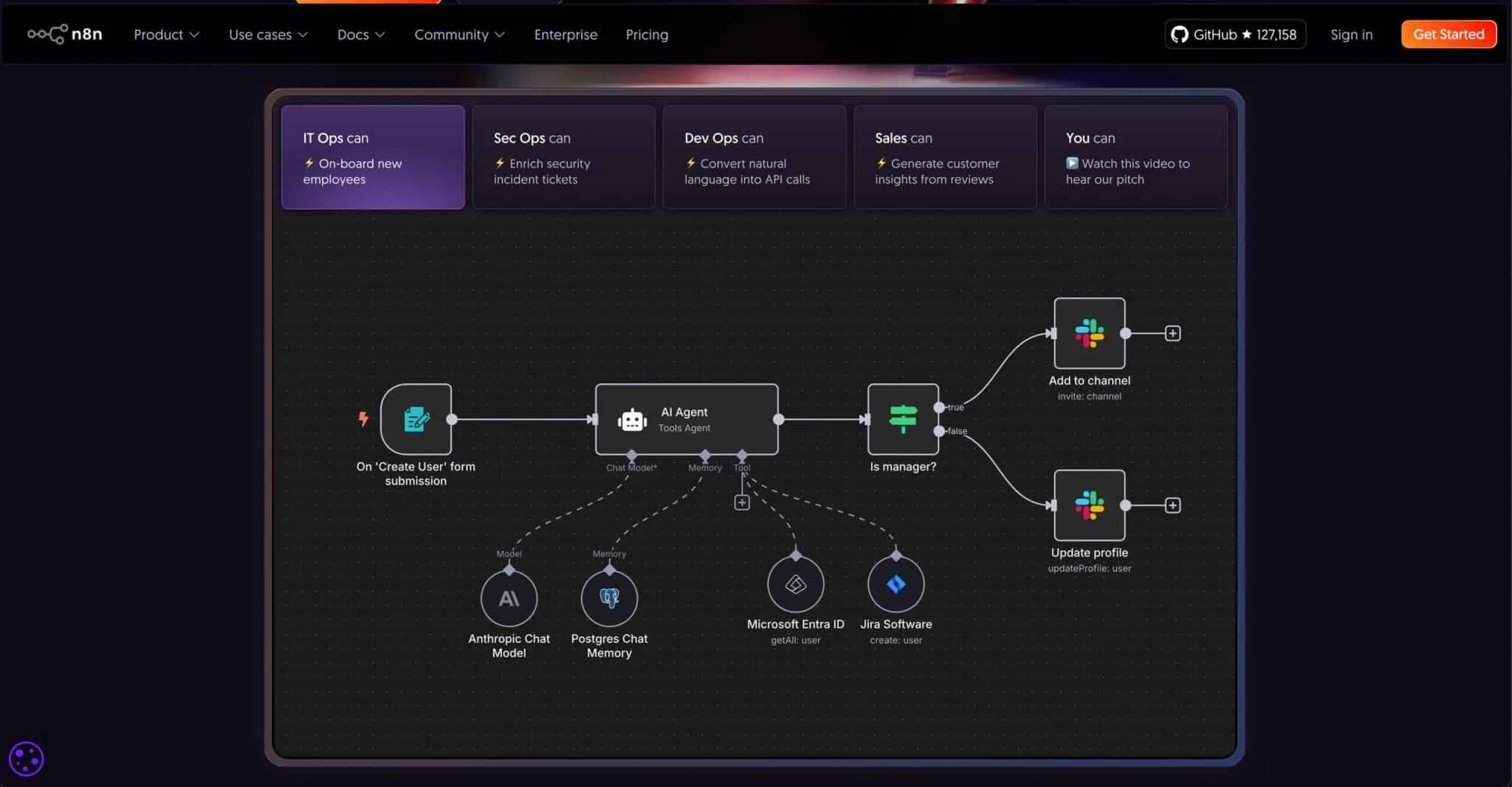
This is an ideal starting point. Tools such as Zapier, Make (formerly Integromat) or n8n work like digital LEGO bricks. They allow you to connect hundreds of popular applications (like Gmail, Trello, Slack, Google Calendar, Facebook) without writing a single line of code.
How it works. You define a simple rule: “If X happens in application A, execute Y in application B.”
- Example: “When an email with an attachment arrives in my Gmail inbox, automatically save that attachment to my Dropbox folder and send me a notification on Slack.”
Pros:
- Low entry threshold and cost (often free plans to get started).
- Instant implementation - you can create your first automation in 15 minutes.
- A huge number of ready-made integrations.
Minuses:
- Limited capabilities - you operate only within what the tool offers.
- With more complex processes, subscription costs can increase significantly.
- Lack of customization for your company’s very specific, unique processes.
Level 2: Integration of existing systems
Most companies already use several specialized systems - such as an invoicing program (e.g., Faktownia, inFakt), a CRM system for customer management (e.g., HubSpot, Pipedrive) or an e-commerce platform (e.g., Shoper, WooCommerce).
The problem is that these systems often do not “talk” to each other. Employees have to manually transfer data, leading to errors and delays. The solution is to integrate them. This is where the concept of APIs becomes crucial.
| What is an API (Application Programming Interface)? Imagine that an API is a restaurant's "menu." It allows one program (the customer) to place a precise order and receive a response from another program (the kitchen), without having to go into the kitchen and understand exactly how the dish is prepared. With an API, your online store can "ask" your warehouse system about product availability, and your CRM system can "ask" your invoicing program to invoice a new customer. |
Integrating systems via APIs is a task for developers, but it offers tremendous opportunities. You can create a central “cockpit” (dashboard) that collects data from all the tools and presents it in one place, giving you a complete picture of the company’s situation.
What processes in your company most urgently need integration? Some supporting questions:
- Between which two programs do your employees most often copy and paste data?
- What error, resulting from manual data entry, has cost the company the most recently?
- What information from one system (e.g., sales) would be most valuable in another system (e.g., for marketing planning)?
- Where in the customer service process do the most delays occur because an employee has to wait for data from another department/system?
Level 3: Dedicated tailor-made systems (with and without AI)
What if your business operates in such a unique way that no off-the-shelf tool meets your needs? What if the process you want to automate is your main competitive advantage and you don’t want to rely on external platforms?
Then we enter the world of dedicated software. These are systems written from scratch, perfectly tailored to your requirements. This is the highest, but also the most costly and time-consuming level. Building such a system often starts with an MVP version.
| What is an MVP (Minimum Viable Product)? It's a "Minimally Satisfactory Product." Instead of building a system with all possible features for a year, we create the simplest, but already working and value-adding version. This allows us to quickly validate the idea in the market, gather feedback from real users and develop the product based on data, not just assumptions. Learn more. |
At this level also comes the real magic, namely artificial intelligence (AI). Dedicated systems can be equipped with modules that not only automate tasks, but also learn and make decisions.
| What is Machine Learning? It's a field of AI that involves "learning" algorithms from massive amounts of data. Instead of programming rigid rules, we let the system discover patterns on its own. Imagine the system analyzing traffic and weather data on its own to assign your drivers 15% shorter routes each morning. That's a direct savings on fuel and labor time - that's what machine learning does. |
Examples of dedicated systems with AI:
- For e-commerce: a recommendation system that learns a customer’s taste and suggests products that they are most likely to buy.
- For manufacturing: A system that analyzes images from cameras on the production line and automatically detects defective pieces of product that the human eye might not notice.
- For a service company: A system that analyzes historical data and predicts which customers are at risk of leaving, allowing the service department to respond proactively.
How to get started. Automation step by step
Regardless of which level you want to operate at, the process of implementing automation looks similar. Going through the steps in an orderly fashion is the key to success.
- Audit and Process Identification: Before you automate anything, you need to understand how your business works now. Take a piece of paper or open a spreadsheet and, together with your team, write down all the repetitive tasks. Which ones are the most time-consuming? Which ones generate the most errors?
- Define Goals and Measures (KPIs): Don’t automate for the sake of automating. You need to know what you want to achieve. Is the goal to reduce inquiry handling time by 50%? Or reducing order errors to zero? Define specific, measurable goals.
- Technology Selection: With the problem and goal defined, you can start looking for a solution.
- Implementation and Testing: Regardless of the technology you choose, phased implementation and testing is key. Don’t enable automation for all customers at once. Run it on a small slice, test that it works properly, gather feedback from the team and only then scale the solution.
- Measuring Results and Optimization: revisit your goals and metrics defined in Step 2. Have they been achieved? Did automation actually reduce work time? Analyze the results and look for more fields for improvement. Automation is not a one-time project, but an ongoing process.
The most common pitfalls - what to watch out for?
The road to automation can be bumpy. However, it’s worth noting that most mistakes are not due to technology, but to strategy and communication. Here are some pitfalls you should watch out for:
- Automating a bad process: If you have a messy process, automating that mess will only give you a faster mess. Simplify and clean up the process first, and only then automate it.
- Lack of clear goals: Implementing tools without defining what they are meant to improve is an easy way to burn through the budget and frustrate the team.
- Ignoring the human factor: Your employees may fear that automation will take away their jobs. Communication is key - explain that the goal is to take the tedium out of their duties so they can tackle more interesting tasks. Provide appropriate training.
- Choosing an overly complicated tool to get started: You don**’** t need a dedicated system with AI to automatically save attachments from emails. Start with simple solutions, learn and develop an appetite for more.
Summary: Your first 3 steps into the world of automation
As we mentioned, the journey through the world of automation may seem complicated, but the key is to get started. You don’t have to revolutionize your entire company right away. Focus on small but tangible victories.
Here’s your simple starter list:
- Make a list. Sit down with your team for 30 minutes and write out the 10 most repetitive and disliked tasks in the company.
- Pick one thing. Don’t try to fix everything at once. Choose one task from the list that is relatively simple and whose automation will bring quick relief.
- Check the tools in Level 1. Go to the Zapier, Make or n8n website. Check to see if the applications you are using in your chosen process are listed. Try to “click” your first, simple automation.
Remember, automation is a marathon, not a sprint. Every automated process is another step toward building a company that works smarter, not harder. It’s a foundation that will allow you to grow faster and more steadily than your competitors.